TL;DR
E-commerce search autocomplete should guide shoppers to in-stock products, categories, and content, but versions built from popular queries rather than retail context send them to nonsense, out-of-stock terms, and zero-result pages. Voyado ranks suggestions in real time on stock, variants, synonyms, typos, personalization, and merchandising rules – the richer signals that helped H&M cut zero-hit searches by 50%. Across 5 million daily searches for 500+ retail brands, Voyado turns the first two letters users type into stock-aware, intent-matched paths to converting products.
Search engine autocomplete should be the shortest route to a sale. On many storefronts, a shopper types two letters in the search box, gets a list of nonsense, picks one, and lands on a search results page with nothing to buy. Then they leave with an empty £85 basket.
Every zero-result search query is a direct revenue leak. When a UK shopper types “trainers” and your catalog only knows “sneakers,” you miss demand you already paid to attract. More traffic won’t fix that; autocomplete decides whether the traffic you already have converts.
This guide gives you an overview of what good suggestions look like, a tool scorecard, and a test that proves lift.
What search engine autocomplete means in e-commerce
Search engine autocomplete in e-commerce is the on-site suggestion layer of product discovery, firing as soon as shoppers start typing, usually after two letters. When done well, predictive search suggests options before the query is finished. Generic search suggestions or out-of-stock products waste your highest-intent moment.
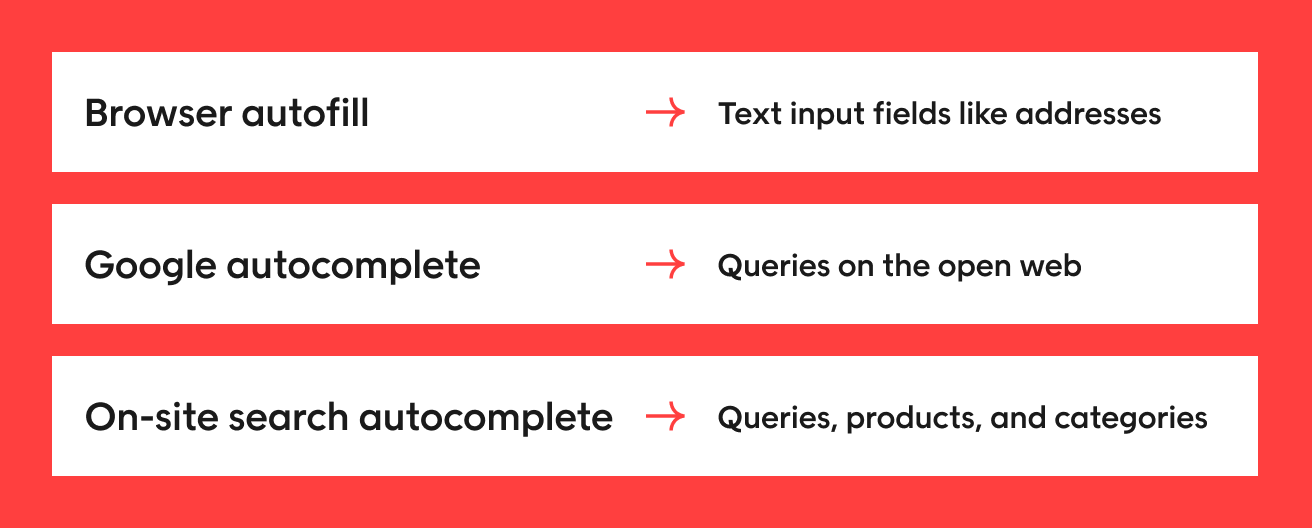
Search autocomplete is not browser autofill
Three different features share the name:
| Type | What it completes | What it draws on |
| Browser autofill | Text input fields like addresses | Details saved in the browser |
| Google autocomplete | Queries on the open web | Popularity and past searches |
| On-site search autocomplete | Queries, products, and categories | Your catalog, stock, variants, and merchandising |
Only on-site autocomplete can access your stock and merchandising rules, so this guide covers storefront discovery only.
Why autocomplete search suggestions fail shoppers
Search engine autocomplete usually fails the same way: users type two letters, get generic or out-of-stock phrases, then hit a zero-result page. Run this diagnosis on your own search box.
Type the first letters of a best-selling category, a misspelling, and a local term. Notice where autocomplete suggestions stop guiding and start guessing.
Popular queries are not the same as purchase intent
What people typed most isn’t what they bought or added to bag. Ranking on popularity and query volume alone slows high-intent visitors on their way to a product.
Example: H&M cut zero-hit searches by 50% with Voyado after adding purchase, add-to-bag, revenue, newness, and stock signals to search and ranking.
Out-of-stock, typo, and synonym misses create dead ends
Three gaps cause most dead ends:
- Stale stock: autocomplete data that doesn’t update in real time suggests products shoppers can’t buy.
- Typos: misspellings break matching before the shopper notices.
- Local synonyms: “trainers” may return nothing if your catalog says “sneakers.”
With Voyado, stock and localization come built in as retail context.
Generic suggestions slow comparison and increase exits
Text-only strings add a step to the search process: pick a phrase, wait for the search results page, then compare. Product, category, and content suggestions let shoppers compare inside the menu, which matters most on mobile devices where every extra tap costs attention.
What good e-commerce search autocomplete should suggest
Search engine autocomplete earns its place when it guides shoppers instead of echoing what they typed. If “our autocomplete suggests nonsense” sounds familiar, measure against this standard: strong e-commerce search autocomplete combines relevant suggestions across products, categories, and content.
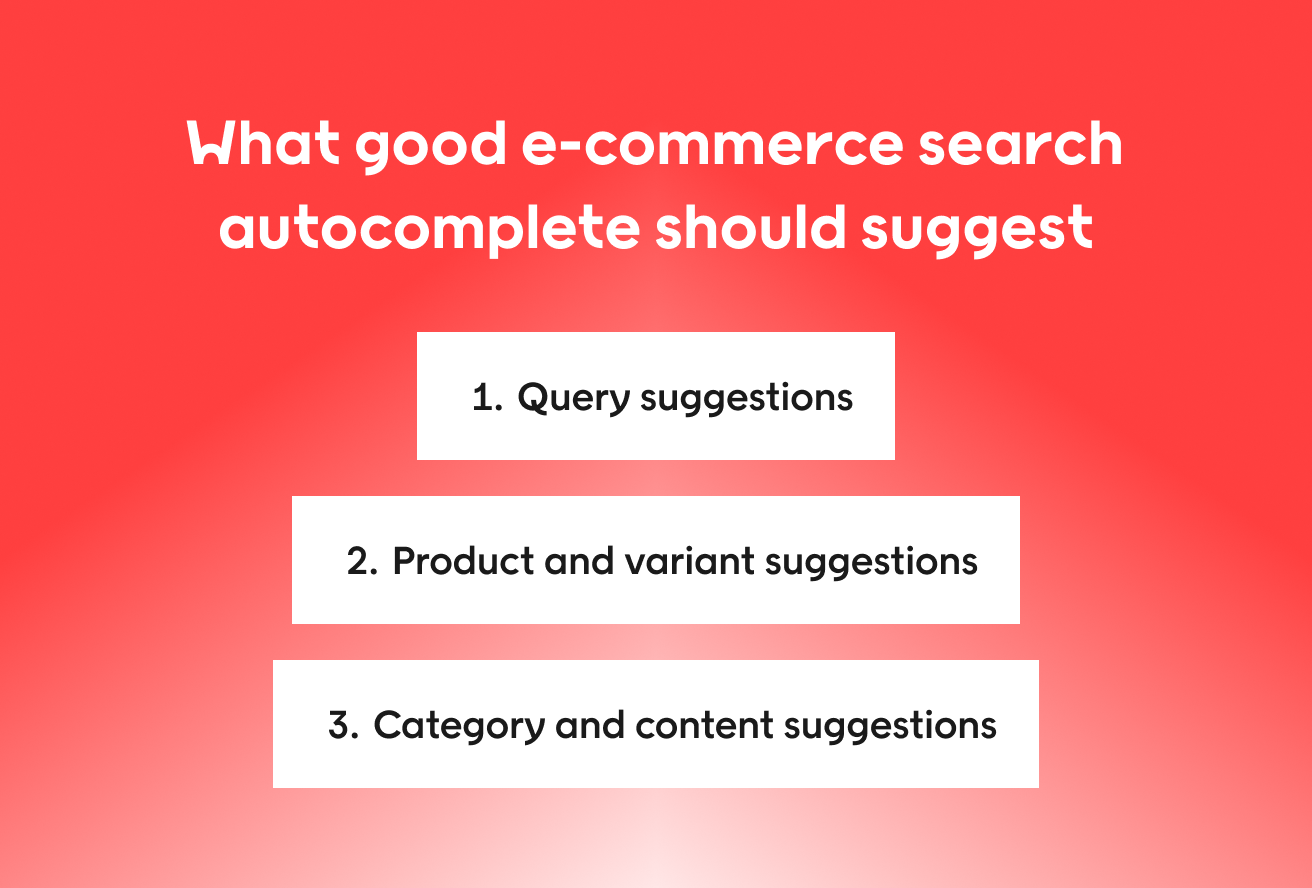
Query suggestions that steer shoppers toward in-catalog terms
Query suggestions translate shopper language into catalog language, so suggested keywords match what you actually stock. Three techniques do the work:
- Synonym handling maps “trainers” to “sneakers.”
- Typo tolerance catches “trainres.”
- Search relaxation turns “white leather trainers size 4 wide” into close matches.
Product and variant suggestions that show availability early
Previews with image, price, and size or color options give shoppers enough details to judge fit before clicking. A shopper in Manchester and one in Munich may need different assortments, so availability must reflect each shopper’s location and market.
Category and content suggestions that support guided discovery
Category suggestions surface popular categories and narrower aisles:
- Fashion: “dress” opens “wedding guest dresses” or “petite fit.”
- Beauty: “moist” opens “moisturizer for dry skin.”
- Homeware: “lamp” opens “living room lighting” or a helpful buying guide.
Merchandisers can pin, boost, bury, or exclude results for “gift,” “sale,” and “wedding.”
How retail context improves search suggestions
Search engine autocomplete turns to nonsense when it’s built from popular keyword strings instead of retail context. Voyado Product Discovery, running on the agentic OS for retail, feeds that context into every query to lift discovery and conversion. Obs and Obs Bygg (Coop Norway) saw a 4.5% increase in revenue from search.
Three artificial intelligence (AI) pillars decide which autocomplete options appear and in what order.
1. Product AI adds the attributes autocomplete needs
Product AI enriches product data with attributes using structured knowledge graphs. As soon as shoppers begin typing, the engine knows variants, newness, seasonality, and that “trainers” means “sneakers.” That knowledge comes built in, rather than learned slowly by generic machine learning models, and powers inventory-aware ranking.
2. Community AI ranks what converts, not just what is typed
Community AI learns from how users interact with search: clicks, searches, add-to-bag actions, purchases, and revenue. It then reorders suggestions toward sales. Voyado applies that learning across 5 million daily searches for 500+ retail brands.
3. Personal AI adapts suggestions to the shopper in front of you
Two shoppers typing “bl” can see different lists, such as “blazers” from previous searches and purchases or “blue jeans” from this session. Personal AI handles e-commerce search personalization by blending long-term preferences with in-session signals, helping close the conversion gap between new and returning visitors.
Merchandisers keep control with ranking, pins, and exclusions
In e-commerce merchandising, algorithms do the heavy lifting, and merchandisers step in to boost, bury, pin, or exclude without breaking relevance. Rules balance margin, promotions, and inventory, so a weekend deal can top “sale” in the UK without touching EU stores.
A 9-point scorecard for evaluating autocomplete search
Search engine autocomplete is hard to compare when demos from the top e-commerce search solutions all look tidy. Score autocomplete search on nine criteria in three groups, using your own live website in each market.
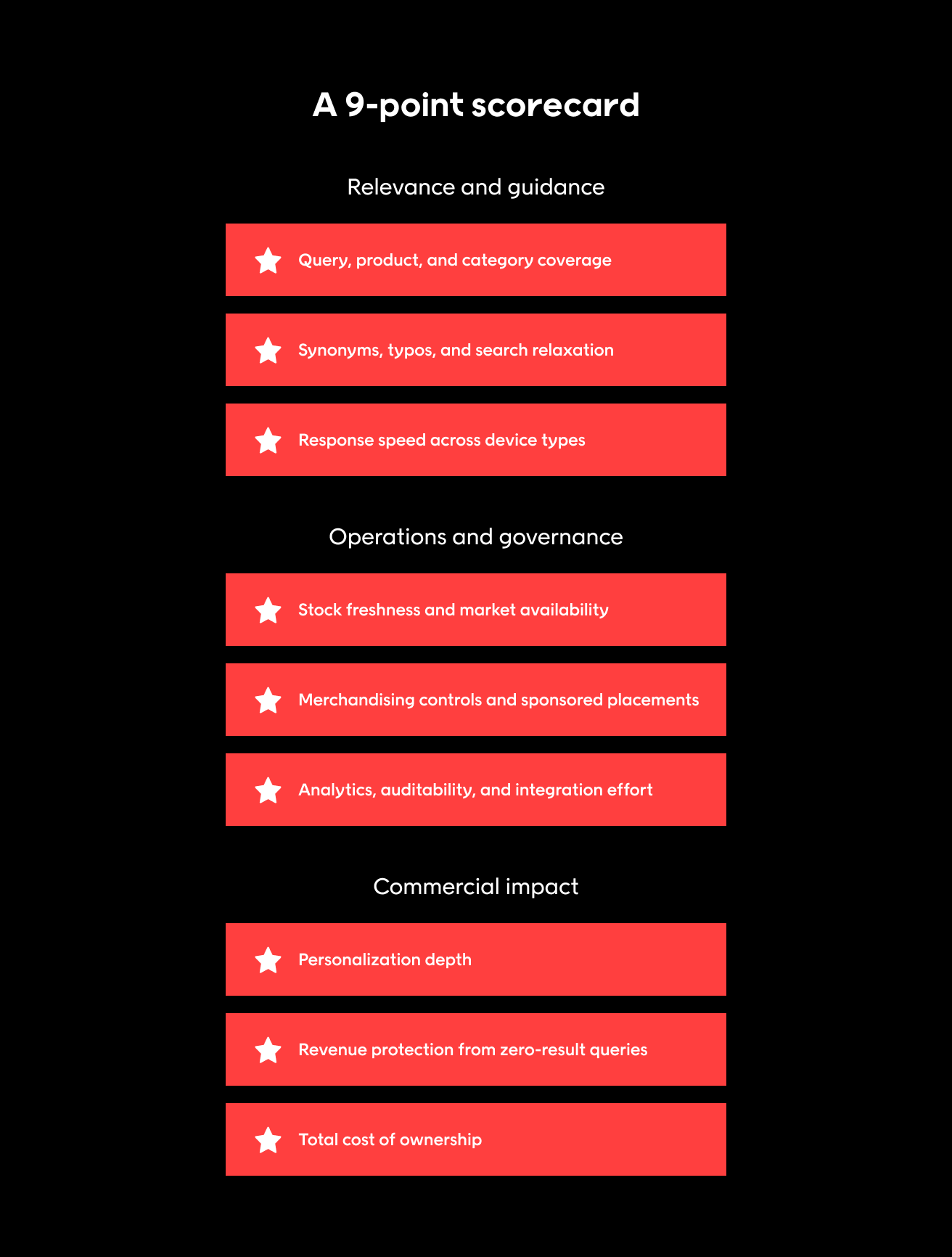
Relevance and guidance
Do suggestions narrow intent or just continue a string? Baymard Institute found 80% of e-commerce sites offer autocomplete, but only 19% get every implementation detail right.
1. Query, product, and category coverage
Test: Type “jacket.”
Pass: One menu shows queries, product previews, and popular categories, with visual suggestions surfacing alternatives.
2. Synonyms, typos, and search relaxation
Test: Type “trainers,” “trainres,” and an over-specific query.
Pass: Intent widens or translates, never dead-ends.
3. Response speed across device types
Test: Type on your slowest template, on mobile devices and desktop.
Pass: Suggestions appear within about 0.1 seconds, the limit Nielsen Norman Group gives for a response to feel instant.
Operations and governance
4. Stock freshness and market availability
Test: Sell out a test product, then search each market.
Pass: It drops out of suggestions in real time, and no shopper sees unavailable items.
5. Merchandising controls and sponsored placements
Test: Pin, boost, bury, and exclude for “gift,” “sale,” and “wedding.”
Pass: Sponsored placements, such as Voyado Retail Media, stay relevant.
6. Analytics, auditability, and integration effort
Test: Confirm the tool can generate reports on top, zero-result, and low-converting queries, plus change history and integration effort.
Pass: A/B tests should measure purchases, not clicks.
Commercial impact
7. Personalization depth
Test: Type the same letters as a new shopper and a returning shopper with different past searches.
Pass: Lists differ by profile and session.
8. Revenue protection from zero-result queries
Test: Multiply monthly zero-result searches by search conversion rate and average order value, say £60.
Pass: Benchmark against H&M’s 50% zero-hit reduction.
9. Total cost of ownership
Test: Compare tuning effort, data dependencies, how much catalog data you need to upload, and time to usable relevance in £.
Pass: Built-in retail knowledge keeps tuning low. UK and EU pricing isn’t available here, so request quotes.
How to measure whether search suggestions lift revenue
More search engine autocomplete clicks don’t automatically mean more sales. Shoppers who use search suggestions often arrive with stronger intent, so their higher conversion doesn’t prove lift.
Metrics to track from suggestion to order
Track every step of the search process, from first keystroke to order:
- Impressions show whether the autocomplete feature fires.
- Selections show whether suggestions match intent.
- Zero-result rate rising means unmatched demand.
- Search abandonment rising means results miss.
- Add-to-cart rate shows product fit.
- Conversion shows whether sessions end in orders.
- Revenue per search session ties it to £.
Prioritize top, zero-result, and low-converting queries, plus high-exit search results pages.
A/B test design that avoids false positives
When you start A/B testing, randomize by shopper, keep the split consistent across device types, and run long enough to capture purchases. Measure incremental revenue per shopper between groups.
Benchmarks and proof points to ground expectations
Voyado clients see an average 15-20% conversion uplift across Product Discovery, and Obs and Obs Bygg saw 4.5% more revenue from search. These are discovery outcomes, not autocomplete guarantees, so set a baseline first.
How UK and EU retailers should handle search autocomplete
Search engine autocomplete breaks across UK and EU stores when localization, privacy, and accessibility come last.
Localization across language, spelling, and assortment
Four local factors shape suggestions: product names, diacritics like the Swedish “ö,” currencies, and market catalogs. “Trainers” must work in London and “sneakers” in Amsterdam, priced in £ or €. Test local names, misspellings, and habits per store and location before rollout.
Privacy-aware personalization under UK GDPR and EU GDPR
Two levels of personalization need different data:
- Session relevance uses in-session behavior, so anonymous visitors still get relevant results, even on cold starts in e-commerce.
- Profile-based personalization uses stored history such as previous searches and orders.
Under the General Data Protection Regulation (GDPR), your legal team should review lawful basis, retention, and consent.
Accessibility checks for dynamic suggestion menus
- Arrow keys move through suggestions, Enter selects, and Escape closes.
- Focus stays in the text input.
- Screen readers announce suggestion changes and the number of autocomplete options.
- Tap targets are large enough for thumbs on mobile devices.
MDN covers form autofill, not retail suggestion menus, so lean on resources like Baymard Institute’s e-commerce search research for drop-down usability.
From nonsense suggestions to guided discovery
Nonsense autocomplete suggestions cost you sales, while stock-aware, intent-matched suggestions move shoppers to products. Retail context fixes the root cause by changing how autocomplete works, not just how it looks.
Voyado applies the same retail context across search, browse, and recommendations, so search results stay consistent from search box to product page. If your website runs 1M+ monthly sessions, you can also start with a free product discovery audit that compares results side by side using your data.
FAQs
How do we compare autocomplete tools that rank suggestions by what shoppers actually buy, rather than just popular searches?
Compare search engine autocomplete tools on ranking inputs, not front-end demos. Test whether purchases, add-to-bag actions, revenue, newness, stock, and personalization change the suggestion order, not popularity alone. H&M cut zero-hit searches by 50% after adding richer signals like these to search and ranking.
Can autocomplete exclude suggestions that lead to out-of-stock products without hiding useful alternatives available in that shopper's market?
Yes, when ranking is inventory-aware and autocomplete data updates in real time. To check:
- Change live stock on a test product.
- Mark one variant unavailable.
- Apply UK delivery filters.
- Confirm suggestions swap to in-stock substitutes, variants, or valid category paths.
How do we check whether an autocomplete tool handles local product names, misspellings, and shopping habits across our UK and European stores?
Score every search engine autocomplete tool on the same fixed UK and EU query set:
- “Trainers” versus “sneakers” in the UK
- Words with diacritics
- Common misspellings
- Multilingual queries
- Items stocked in one market only
Typo tolerance and synonym handling should return relevant suggestions and keep every query off a no-results path that ends the session.
What should we measure in an A/B test to tell whether better autocomplete suggestions increase purchases, not just clicks?
Track how users interact with autocomplete suggestions through impressions, clicks, product views, add-to-bag actions, purchases, and revenue per search session in £. Suggestion users converting better isn’t causal proof, since they often arrive with stronger intent. Randomize at shopper level and compare revenue between groups.
Why isn't Google Search autofilling?
The short answer: Google autocomplete is a separate problem, managed through your Google account and browser settings. On-site search engine autocomplete is different, and retail context fixes it: Voyado elevates predictive search features with product, category, and content suggestions.